
Job Opportunities API for n8n
Import fresh job postings into any n8n workflow with a ready-made template.
- Official
- Open source
- No code
Self-hosted n8n: Settings → Community Nodes → Install → n8n-nodes-job-opportunities-api. n8n Cloud (verified nodes only, review pending) or no installs: use the template below, core nodes only.
Set it up in 4 steps
You need a free API key (no card) — get one here.
Import the template
Download the template above. In n8n, open a new workflow, choose ⋯ → Import from File and pick the .json file (or paste its contents onto the canvas).
Create the Header Auth credential
Open the "Search jobs" HTTP Request node, create a new Header Auth credential and fill in the two fields below with your free key. The template ships with no key in it.
Header Auth credentialName: Authorization Value: Bearer YOUR_API_KEYSet your search
Edit the query parameters on the same node: country (ISO codes, comma-separated), q (keywords over title, company and location), remote (remote, hybrid, on_site) and limit (keep it at or below your key's page size).
Run it, then connect the output
Click Execute workflow. The Split Out node turns the response into one item per job and Edit Fields keeps title, company, location, apply_url, posted_at and attribution. Add Google Sheets, Slack, Airtable or your CMS after it, then activate the workflow so the daily schedule runs.
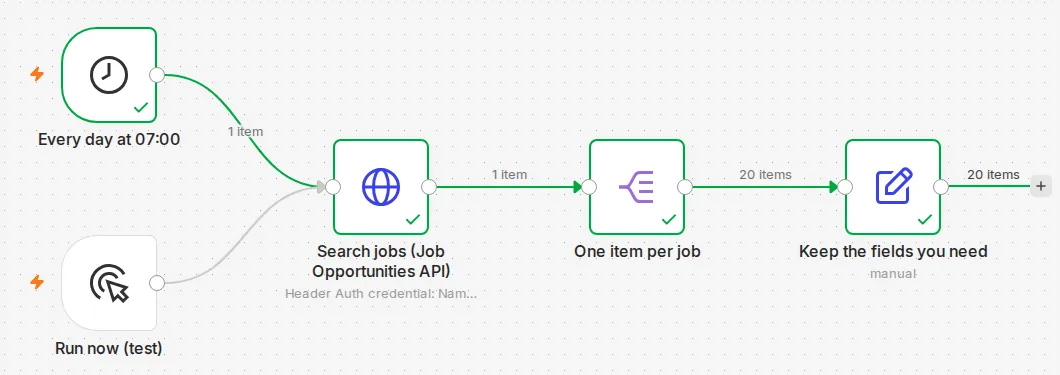
Example: for job boards
A job board on Webflow or Airtable runs the template every morning with country and category filters, then adds an Airtable "Create or update" node keyed on apply_url, so each role appears once and links straight to the employer.
Example: for AI agents
Connect the HTTP Request node to n8n's AI Agent as a tool, or run the template first and hand the cleaned items to an LLM node to write a daily digest such as "new remote data roles in the Netherlands".
Questions
Straight answers about plans, metering and what to show.
How is usage counted?
Every job row the API returns counts against your plan's monthly record allowance, exactly as a direct API call would. The free key has a small monthly allowance and needs no card, so start with small page sizes and a daily schedule rather than polling every few minutes. Your key's largest page size is in GET /v1/me (limits.max_page_size).
Is there a dedicated n8n node?
A Job Opportunities API community node is built and its source is on GitHub; it is not in n8n's node directory yet. The template needs nothing installed and works on n8n Cloud and self-hosted today.
Can it remove jobs that have closed?
Yes, two ways. The change feed (/v1/changes) and the closure feed (/v1/jobs/expired) are on the Growth plan and above and are the cheapest way to keep a copy in sync. On every plan you can re-check a single job with GET /v1/jobs/{id}?include_closed=true, which returns it with status "closed" once the employer has taken it down.
Where do applicants apply?
On the employer's own site. Every job carries apply_url, the employer's application page or applicant-tracking-system link. Job Opportunities API never sits between the candidate and the employer, so always use apply_url as the apply button.
Do I need to show any attribution?
Yes, one line where listings are shown publicly: a visible credit "Data: Job Opportunities API" linking to https://jobopportunitiesapi.org (see /terms — storing, displaying, reselling and redistributing within your key's plan limits are all allowed). In addition, jobs listed through Erioun for Teams carry an attribution field (for example "via Erioun for Teams") and a canonical_url: when attribution is present, show it with the listing and link to canonical_url.
Related integrations
Get a free API key
No card. The same key works for every integration on this site.